
Solution 03 · Production
Cut setup time, because production knows what comes next
When the machine becomes free, tools, fixtures, material and program are ready. Operators and production planning see in good time what is coming and what is still missing for it.
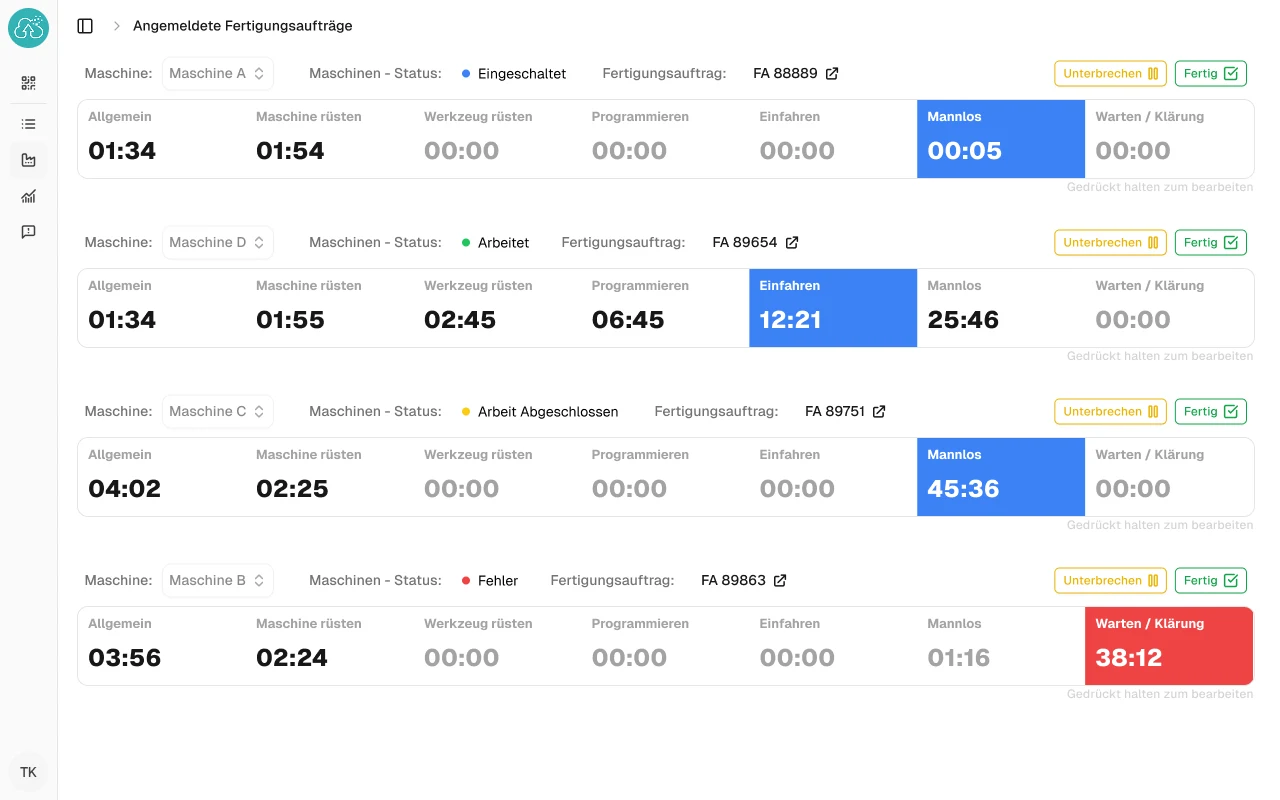
Where setup time is really lost: searching, waiting, asking
Anyone who measures setup time usually looks at the work at the machine: changing fixtures, inserting tools, setting the zero point, checking the first part. That is the part your operator has under control. The time before it does not show up in any report.
The order is finished, the next one is due. But the fixture is still on another machine, the program has not been released, and someone is looking for the material in the warehouse. The operator asks the foreman, the foreman calls production planning. The most expensive machine on the shop floor is waiting for information.
That is not the people’s fault. The sequence is in the ERP or in the foreman’s head, the tool list in the routing, the material status in the warehouse. Nobody sees it all together, and certainly not early enough to prepare while the machine is still running.
The result
Real-time dashboard: order, tools and material ready in time
A display at the machine and an overview for production planning and tool presetting, from the same data, without duplicate data entry.
What comes next
For each machine, the current order and the next ones in line. The operator does not have to go to the foreman’s office to find out what happens next.
What needs to be ready for it
Tools, fixtures, material and program for the next order, with their status: at the machine, in presetting, still in the warehouse, not released.
Where it gets tight
The fixture is still on another machine, the material has not been sawn: you see it while the previous order is still running.
Under the hood
Prepare while the machine is still running
Part of the setup can only be done with the machine stopped: changing fixtures, inserting tools, setting the zero point. The rest can be prepared while the previous order is still running: presetting tools, fetching material, getting the program ready. But only someone who knows what is coming can prepare for it. That is the information we deliver. The setup itself is up to you.
-
1
Fetch the sequence
Production orders, operations and completion confirmations come from your ERP, through an interface, the database or a regular export. If the foreman sets the sequence, they do so directly in the overview.
-
2
Check what each order needs
The routing and the bill of materials show which tools, fixtures, programs and material the next order needs. Each item shows its status.
-
3
Show it where preparation happens
On the monitor at the machine, in tool presetting, in the warehouse and in production planning. Everyone sees the part they need, in your terms, not ours.
How we want to be measured
A goal beforehand, a check afterwards
Before we start, we agree with you on what should change, in one sentence your production manager would sign. For example: “When the machine becomes free, tools, fixtures and material are in place.” Or: “Presetting knows the day before which tools will be needed tomorrow.”
Before we start, we record together how long it currently takes from the last good part to the next first good part, otherwise there is nothing to compare afterwards. At the end, we check whether the goal has been reached. If not, we keep improving, just as you do in your own customer projects.
Frequently asked questions
What you want to know about setup time
In our company the foreman sets the sequence, not the ERP. Will this still work?
Yes. The display needs a sequence, but it does not have to come from detailed scheduling. If your foreman decides each morning what runs on which machine, they can do exactly that in the overview, and everyone else sees it without having to ask.
All that matters is that the sequence is kept in one place, not on a note at the machine and in a list in the office as well.
Do we need a machine connection or an MES for this?
Not necessarily. To start with, what is in the ERP is usually enough: production orders, operations, planned times and completion confirmations. From these, we can estimate when a machine will become free and what comes next.
Where you already have shop floor data collection or machine data, we use it. Whether an additional connection is worthwhile, we find out in the potential analysis, before anyone runs a cable.
Do you work with our ERP system?
Very likely. What matters is that we can get to the data: through an interface, the database or an export. If we do not know your system yet, we will say so openly and look at it together with your IT before we promise anything.
What does it cost, and is it worth it for us?
That depends on the bottleneck, which is exactly why the potential analysis comes first: afterwards you know the expected benefit and a realistic order of magnitude for the effort. We work in stages, each of which is usable on its own. You decide again after every stage and know beforehand what it will cost.
Feel free to weigh that against what an hour of searching, a round of rework or a postponed FAT date costs you today.
Are your machines waiting for tools or material too often?
Tell us where things get stuck. We will tell you honestly whether software pays off at that point and whether we are the right people for it.
Not quite there yet? Two-minute bottleneck check. No sign-up, no email address.