
Solution 01 · Assembly
Assembly planning that keeps your FAT date
Every morning you see which assemblies are really ready to build and which three parts are still missing. Your fitter does not start anything that will be left lying around again tomorrow.
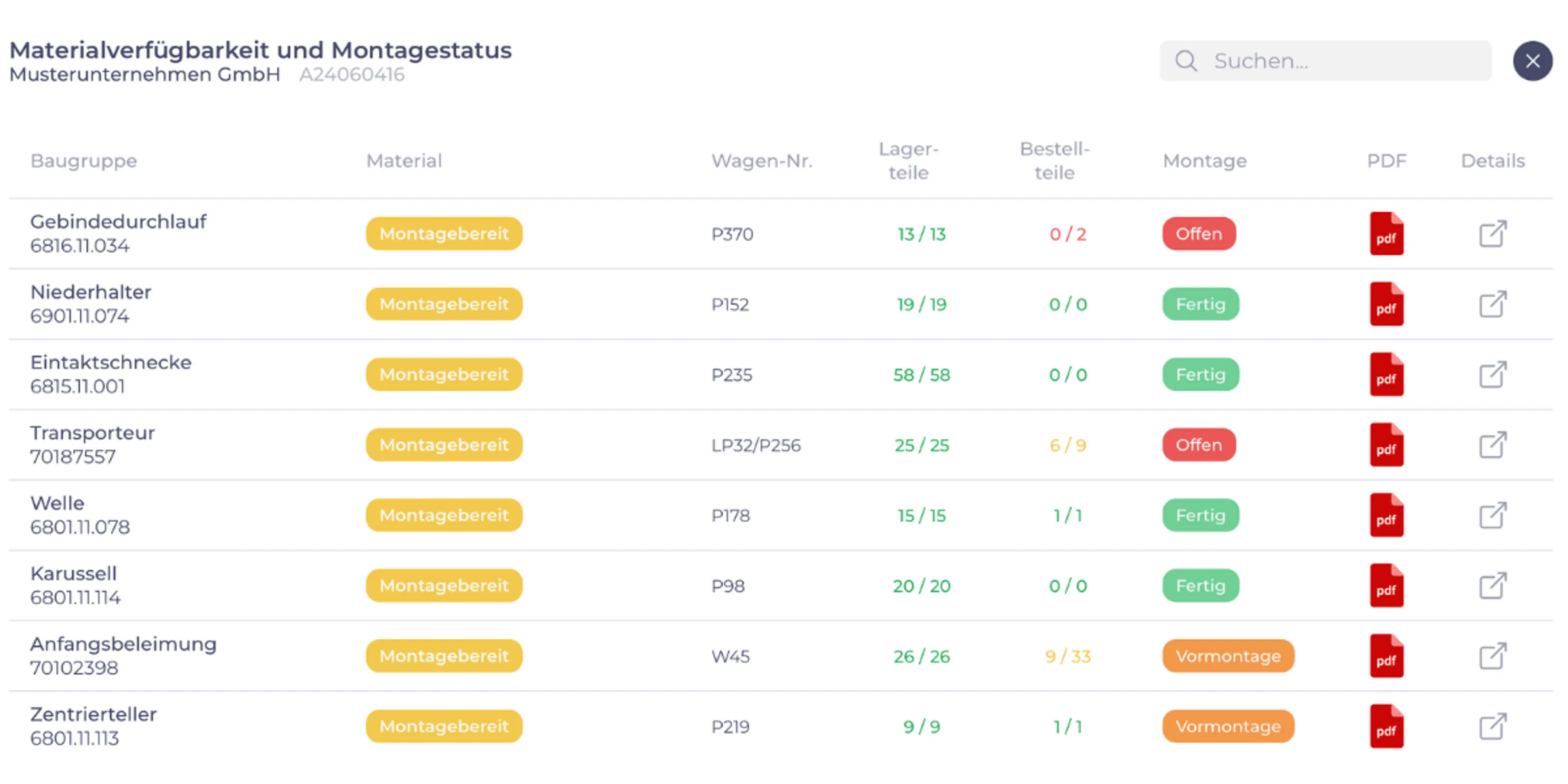
Why assembly stalls: one missing part is enough
In special machine building, an order consists of hundreds of items: bought-in parts, manufactured parts, parts from the contract coater. Your ERP knows every single one. What it rarely answers is the question that counts on the shop floor: Can I build this assembly completely today?
So work begins. Halfway through, a milled part is missing. The fitter looks for it in the warehouse, asks in production and finally sets the assembly aside unfinished. Then they move on to the next one, and it all starts again. After two weeks there are five half-built assemblies on the shop floor, and nobody can say whether the FAT date can still be met.
That is neither a planning error nor an ERP error. What is missing is a view that breaks the bill of materials, stock and open orders down to the assembly, for the people who actually work with it.
The result
At a glance: which assemblies are ready to build?
One view for the shop floor and one for project management, from the same data, without duplicate data entry.
What is ready to build
Assemblies for which every part is in house. This is where your fitter can start, knowing the job will get finished.
What is still missing, and until when
For each assembly, the missing parts with their status: ordered, in production, at the coater, delivery date open.
Which order puts the date at risk
Missing parts that will arrive after the planned start of assembly show up days in advance, not at the workstation.
Under the hood
How the overview comes out of your ERP data
We do not build a second planning system next to your ERP. We read what is already there and present it so that people can act on it.
-
1
Fetch the data
Bills of materials, stock, purchase orders and production orders come from your ERP, through an interface, the database or a regular export.
-
2
Break it down to the assembly
The bill of materials is exploded and checked against stock and incoming supply for each assembly. Result: ready to build, being clarified, or parts missing.
-
3
Show it where the work happens
On a tablet or shop floor monitor for assembly, as an order overview for project management and production planning. The terms are yours, not ours.
How we want to be measured
A goal beforehand, a check afterwards
Before we start, we agree with you on what should change, in one sentence your assembly manager would sign. For example: “Assembly only starts assemblies whose parts are all there.” Or: “We know two weeks before the FAT whether the date can be met.”
At the end, we check together whether this has been achieved. If not, we keep improving, just as you do in your own customer projects.
Frequently asked questions
What you want to know about assembly planning
The master data in our ERP is not clean. Will this still work?
Usually better than expected. The overview does not need perfect data, just three reliable pieces of information: bill of materials, stock and open purchase or production orders. Where the data has gaps, the overview shows them, which makes it clear where data maintenance really pays off.
In the potential analysis, we look together at how reliable your data is before we promise anything.
Do you work with our ERP system?
Very likely. What matters is that we can get to the data: through an interface, the database or an export. If we do not know your system yet, we will say so openly and look at it together with your IT before we promise anything.
Does this replace our assembly planning in the ERP or in Excel?
The ERP remains the source for orders, bills of materials and stock. What goes away are the lists alongside it: the project manager’s Excel sheet, the printout on the shop floor wall, the morning walk round. The overview reads directly from the ERP and shows the data the way assembly and project management need it. And unlike a printout, it is always up to date: when a part arrives at goods receipt, assembly sees it straight away.
What does it cost, and is it worth it for us?
That depends on the bottleneck, which is exactly why the potential analysis comes first: afterwards you know the expected benefit and a realistic order of magnitude for the effort. We work in stages, each of which is usable on its own. You decide again after every stage and know beforehand what it will cost.
Feel free to weigh that against what an hour of searching, a round of rework or a postponed FAT date costs you today.
Is your assembly waiting for parts too often?
Tell us where things get stuck. We will tell you honestly whether software pays off at that point and whether we are the right people for it.
Not quite there yet? Two-minute bottleneck check. No sign-up, no email address.